MacBook Battery Draining Fast on macOS Sequoia or Tahoe
Quick summary
If your MacBook (any Apple Silicon model, M1 through M5) is burning through battery noticeably faster since updating to macOS 15 Sequoia or macOS 26 Tahoe, this is a known pattern with a handful of specific, fixable causes: post-update background indexing, the new Tahoe "Liquid Glass" interface effects, runaway Safari tabs, and a GPU rendering bug in Electron-based apps (Slack, Discord, VS Code). This is not the same as normal battery aging — if your Mac is more than 2–3 years old, also check Battery Health separately (Step 7).
Symptoms you might see
- Battery percentage drops noticeably faster than before, especially right after updating to Tahoe.
- Fans spin up (pro models only) or the Mac feels warm even when it looks idle on the desktop.
- Battery drains while the lid is closed or the Mac is "asleep."
Step-by-step fix
1. Give it 24–48 hours after any major update
Immediately after installing Sequoia or Tahoe, macOS runs background indexing for Spotlight search, Photos face/object recognition, and other one-time setup tasks. This is genuinely battery-hungry but temporary. If the drain started right after an update and it's been less than two days, wait it out before assuming something's wrong.
2. Turn on Low Power Mode
Apple menu → System Settings → Battery → Low Power Mode. You can also toggle it quickly from the menu bar battery icon.
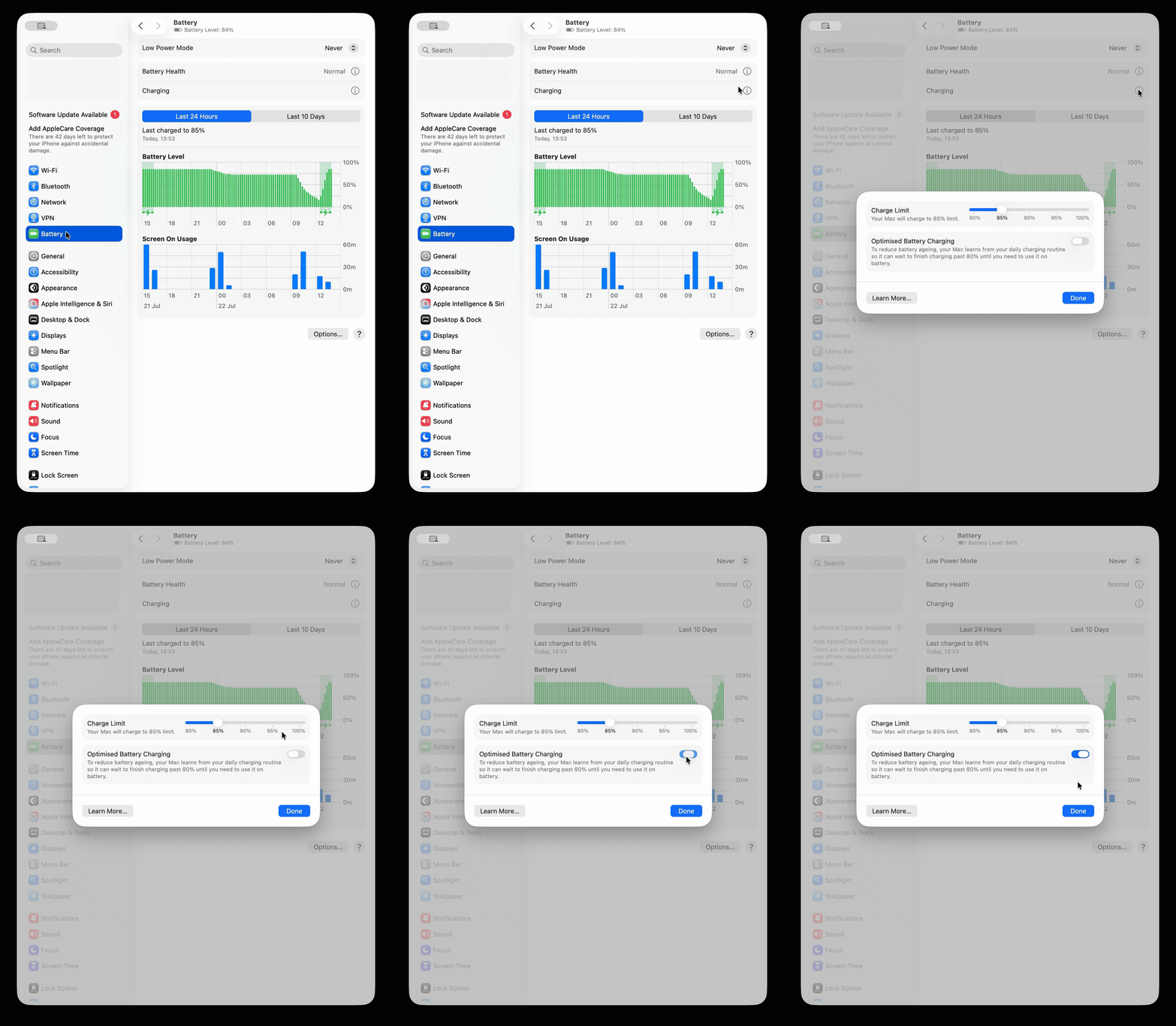
2b. Optimised Battery Charging and battery health, in the same pane
Still in System Settings → Battery, click the (i) next to Charging to confirm Optimized Battery Charging is on, and separately click (i) next to Battery Health to check "Manage Battery Longevity" and see your battery's current maximum capacity.
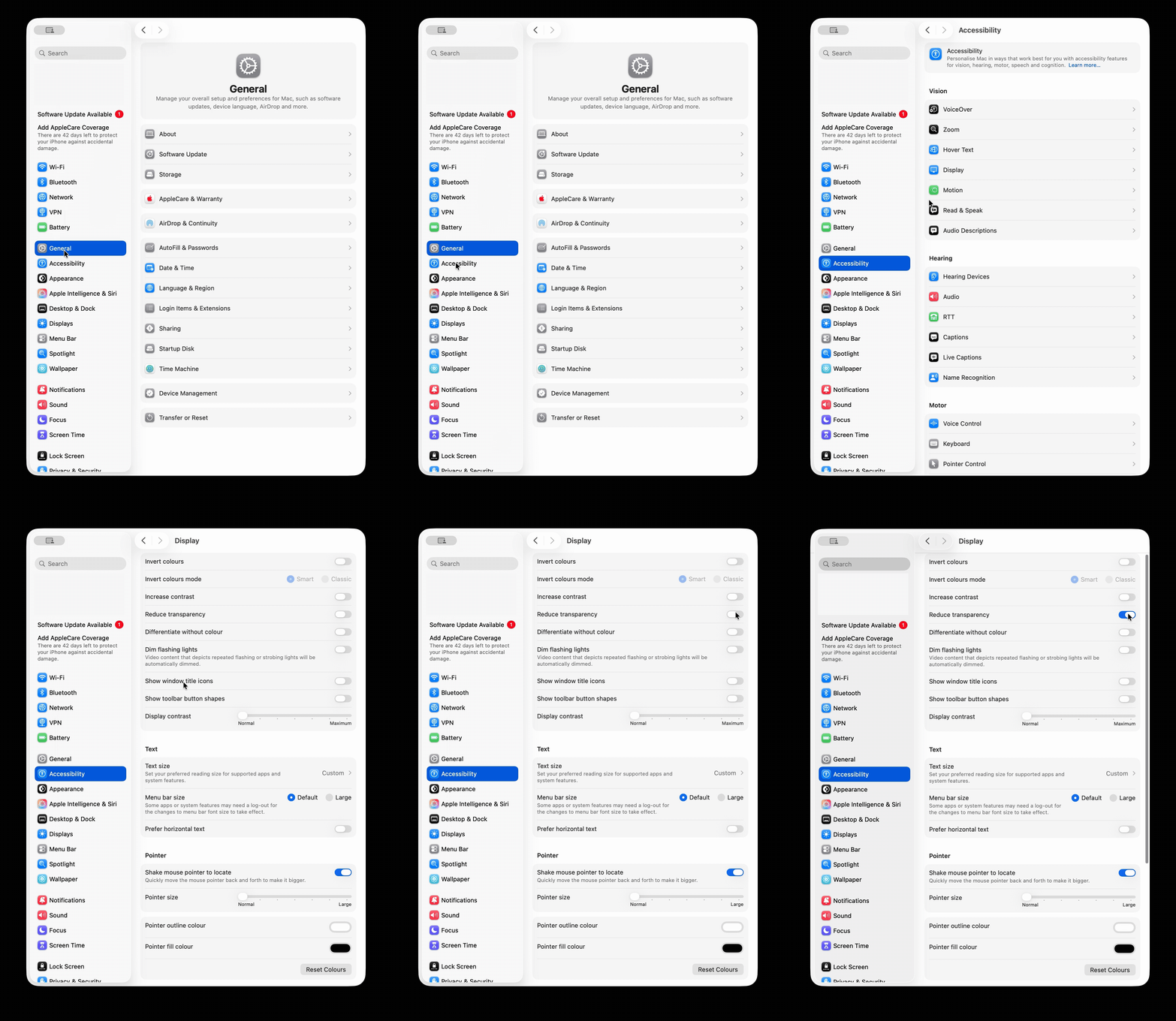
3. Reduce Transparency (this one is bigger than it sounds on Tahoe)
Tahoe's "Liquid Glass" interface uses a lot of live translucency and blur effects, which measurably increases GPU/energy use versus Sequoia's flatter look. Go to System Settings → Accessibility → Display → Reduce Transparency and turn it on.
4. Check what's actually draining it in Activity Monitor
Open Activity Monitor → Energy tab, and sort by "Energy Impact" (click the column header). Look for anything unexpected sitting near the top, especially browsers and chat apps.
5. Update or restart Electron-based apps (Slack, Discord, VS Code)
These apps have had a recurring GPU rendering issue on recent macOS versions where drop-shadow effects get stuck redrawing, spiking energy use even when the app is in the background. Quit and reopen them, and check for app updates specifically (not just macOS updates) — this is patched app-side, not something Apple controls.
6. Close idle Safari tabs
Safari tabs left open for days can leak memory, which forces disk swapping and extra CPU work. If you keep dozens of tabs open as a habit, use Safari → History → Show All History, or bookmark what you need and close the rest, rather than leaving them open indefinitely.
7. Rule out battery aging (separate from software)
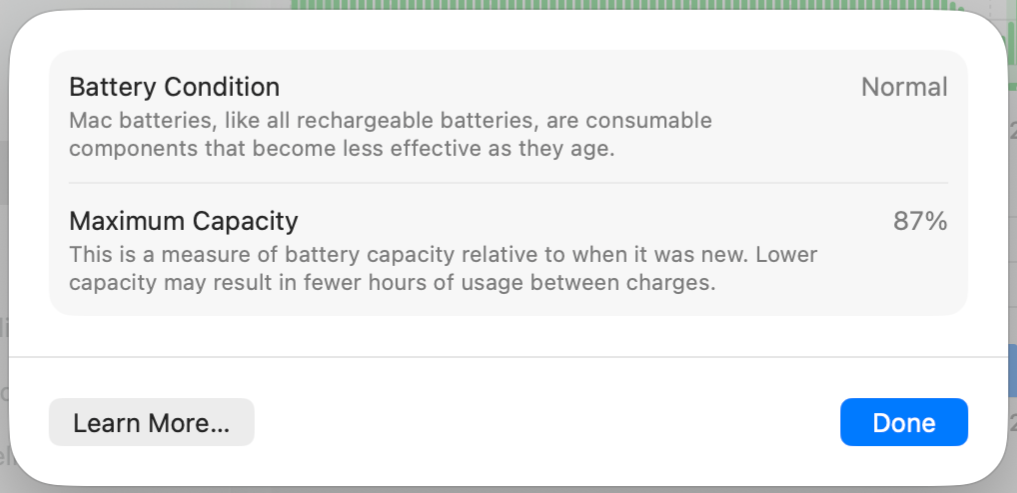
If your MacBook is more than ~2–3 years old, the drain may simply be battery wear rather than anything software-related. In System Settings → Battery → (i) next to Battery Health, check the maximum capacity percentage. Apple considers a battery to be operating normally down to roughly 80% of original capacity; below that, degraded battery life is expected and the fix is a battery service, not a settings change.
Still not working?
If you've done all of the above and the drain is still severe (battery empties in under 3 hours of light use on a MacBook that isn't old), book a check with Apple Support or an Apple Authorized Service Provider — a MacBook diagnostic can rule out a failing battery or logic-board power issue that no software fix will solve.

Created by: Sort IT
Still not sure? Have a question?
Report content
×Report submitted
Thanks for helping keep Sort IT accurate.