New iPhone Battery Draining Really Fast? What's Normal vs. What Isn't
Quick summary
A brand-new iPhone's battery percentage dropping faster than expected in the first few days is usually temporary — new phones do genuinely heavier background work (restoring from backup, re-downloading apps, indexing your data) than a phone you've had for months. Right now, in the UK specifically, there's a second real factor stacking on top of that: an unusually hot, prolonged heatwave, and heat is one of the few things that can measurably affect an iPhone's battery in both the short term (today's percentage) and the long term (permanent capacity loss). This article covers how to tell which one you're dealing with.
Symptoms you might see
- Battery drops noticeably faster in the first few days of owning a new iPhone than you remember from a previous phone.
- Battery percentage drops unusually fast on a hot day specifically, then seems normal again once it cools down.
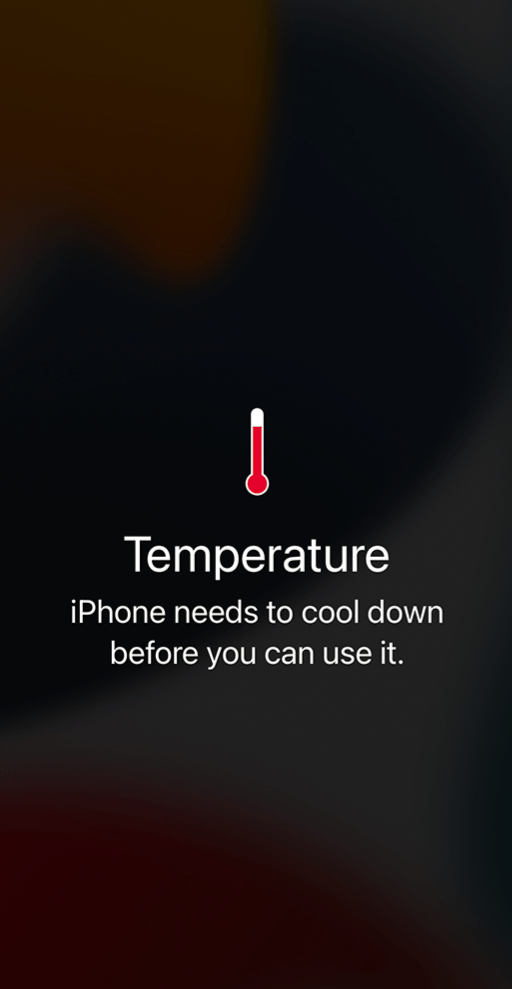
- iPhone shows a "Temperature: iPhone needs to cool down" warning, especially in direct sun, a hot car, or while charging in a warm room.
- Phone feels warm and charging seems slow or stalled on hot days.
Part 1: why a brand-new iPhone often seems to drain faster (usually temporary)
In the first several days after setting up a new iPhone, there's genuinely more background activity than there will be later:
Restoring from an iCloud or device backup continues re-downloading photos, app data, and settings in the background for days, not just during the initial setup screen.
Apps you had on your old phone get reinstalled and then immediately check for updates and re-sync their own data (Instagram, WhatsApp, email, etc. all doing their own first-time sync).
Spotlight and Siri Suggestions spend the first week or two learning your usage patterns, which involves more background indexing than a "settled" phone.
You're likely using the phone more than usual in the first few days — setting up Face ID, moving apps around, checking everything works — which itself uses more battery than normal daily use.
This isn't a fault, and it settles down within roughly a week to ten days for most people. It's worth knowing this before assuming something's wrong.
Part 2: the heatwave factor (currently relevant in the UK)
Apple is explicit that iPhones are designed to operate between 0° and 35°C (32° to 95°F), and that using one in very hot conditions "can permanently shorten battery life" — not just affect today's percentage, but the phone's long-term maximum capacity. In extended heat above that range, several things happen at once, by design:
Charging (including wireless charging) slows down or stops entirely until the phone cools.
The display dims or goes black to reduce heat generation.
Performance drops — apps run with lower frame rates or take longer to respond.
You may see a "Temperature: iPhone needs to cool down" warning screen.
This matters more than usual right now because a genuinely hot UK summer means phones left in direct sun, on a car dashboard, or even just in a pocket on a very hot day are more likely to hit this than in a normal year.
Practical do's and don'ts in hot weather
Don't leave your iPhone on a car dashboard, parcel shelf, or windowsill in direct sun — cabin temperatures in a parked car climb far above the 35°C limit within minutes.
Don't charge it in direct sunlight or right next to a heat source — charging generates its own heat on top of the ambient temperature, which compounds the problem.
Do take a case off (especially a thick or dark-coloured one) while charging on a hot day, since cases trap heat.
Do move it somewhere shaded and let it cool before charging or heavy use, if it's showing signs of running hot.
Step-by-step checks
1. Check Battery Health first
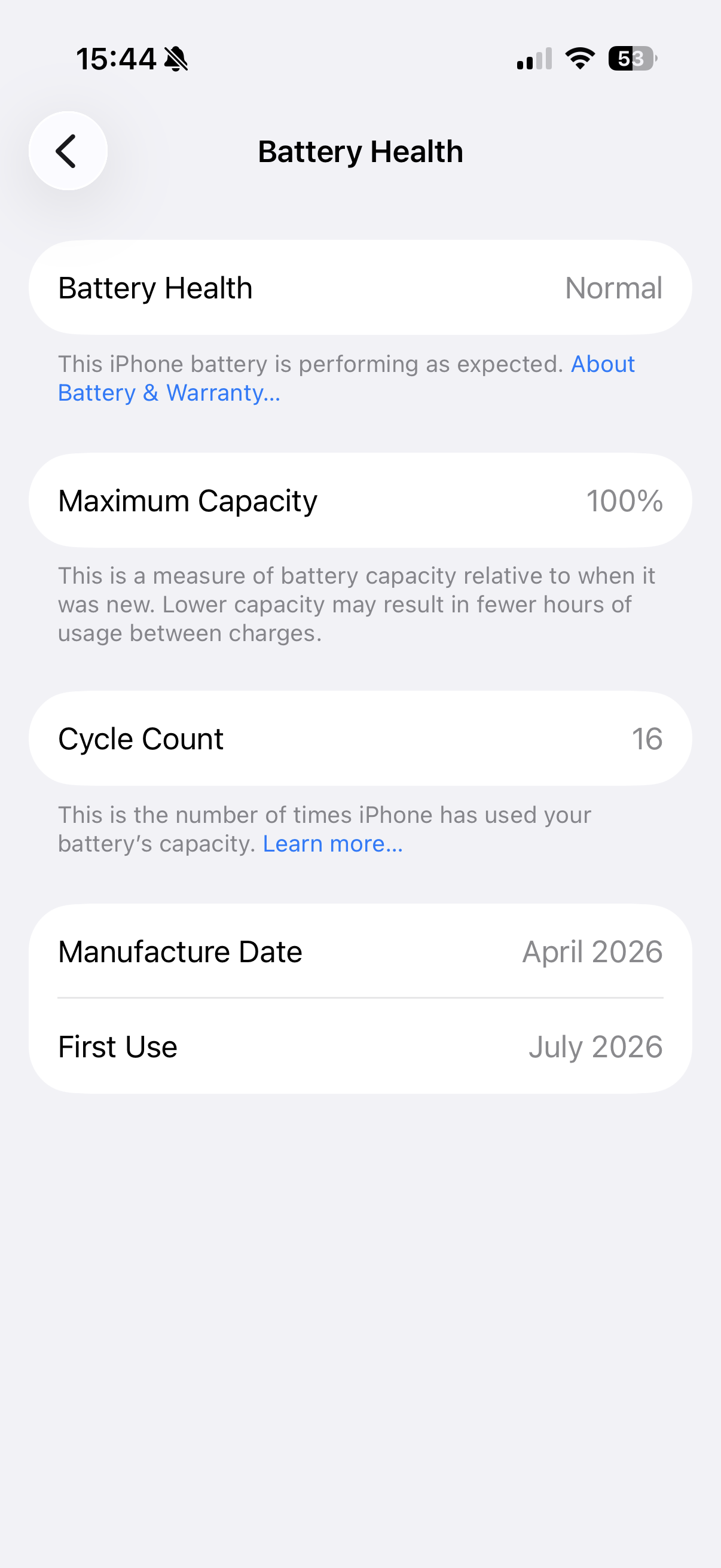
Settings → Battery → Battery Health & Charging. A genuinely new iPhone should show 100% maximum capacity. If a phone you've owned for only a few days already shows meaningfully less than 100%, that's unusual and worth raising with Apple or your retailer rather than troubleshooting further yourself.
2. Check what's actually using the battery
Settings → Battery, and review the app-by-app breakdown along with the "Last 24 Hours" / "Last 10 Days" graphs. In the first week of a new phone, expect to see background/system activity taking up more than usual — this is the "settling in" period described above.
3. Use Low Power Mode on hot days or during heavy first-week setup
Settings → Battery → Low Power Mode, or toggle it from Control Center. This reduces background activity and is genuinely useful both during the initial settle-in period and on days when the phone is running warm.
4. Give it a week before judging long-term battery life
Because of the temporary factors in Part 1, it's hard to fairly judge a new iPhone's real battery life until it's been through a normal week of use, ideally not during an unusually hot spell. If you're trying to decide whether something's actually wrong, a same-week comparison isn't a reliable test.
5. Update iOS
Settings → General → Software Update. Apple has tuned background battery behaviour in point releases before, including around first-setup activity.
Still not working?
If Battery Health shows meaningfully less than 100% on a genuinely new phone, or drain remains severe after a week of normal use in normal (non-heatwave) temperatures, that's outside what's expected — contact Apple Support or your retailer, since a new phone with an already-degraded battery may be a warranty matter rather than something to troubleshoot at home.

Created by: Sort IT
Still not sure? Have a question?
Report content
×Report submitted
Thanks for helping keep Sort IT accurate.